This one isn't entirely related to poketto.me, but it's still an interesting lesson I learned the hard way the other day: If you want to build a "simple" app that automatically posts content to your Instagram account, it's much more difficult than you'd think.
First, there's a GitHub project called instagrapi that seems to offer a nice Python automation library for Instagram. It can post photos, videos, etc. Looks good, right? Don't use it. Ever. It’s based on unofficial APIs, and using it — especially in a script running in a cloud environment — will get your Instagram account blocked almost instantly.
So, back to the drawing board. Instead, build on top of Meta’s official “Graph API.” But that’s far from easy. To do so, so only have to follow these eleven simple steps 😅
1. Create a Facebook account (yikes!).
2. Create an app on Meta’s developer portal with the “right” access permissions.
3. Obtain an app ID and app secret for your app.
4. Convert your Instagram account to a Creator or Business account.
5. Link your Facebook account to your Instagram account (via a "meta" Meta account — no pun intended 😆)
6. Create a Facebook page (double yikes!).
7. Link your Facebook page to your Instagram account.
8. Add your Instagram account as a "Test User" to your app.
9. Obtain an access token for your app and Instagram account using Meta’s Graph Explorer.
10. Convert your "short-lived" access token to a "long-lived" access token using Meta's "Token Debugger" tool.
11. Finally, write the actual Python script that calls the Graph API, for example, via the Pystagram wrapper library, to automate your use case.
Needless to say, most of the tutorials and advice from Gemini, Claude, and ChatGPT have one or more of these steps wrong.
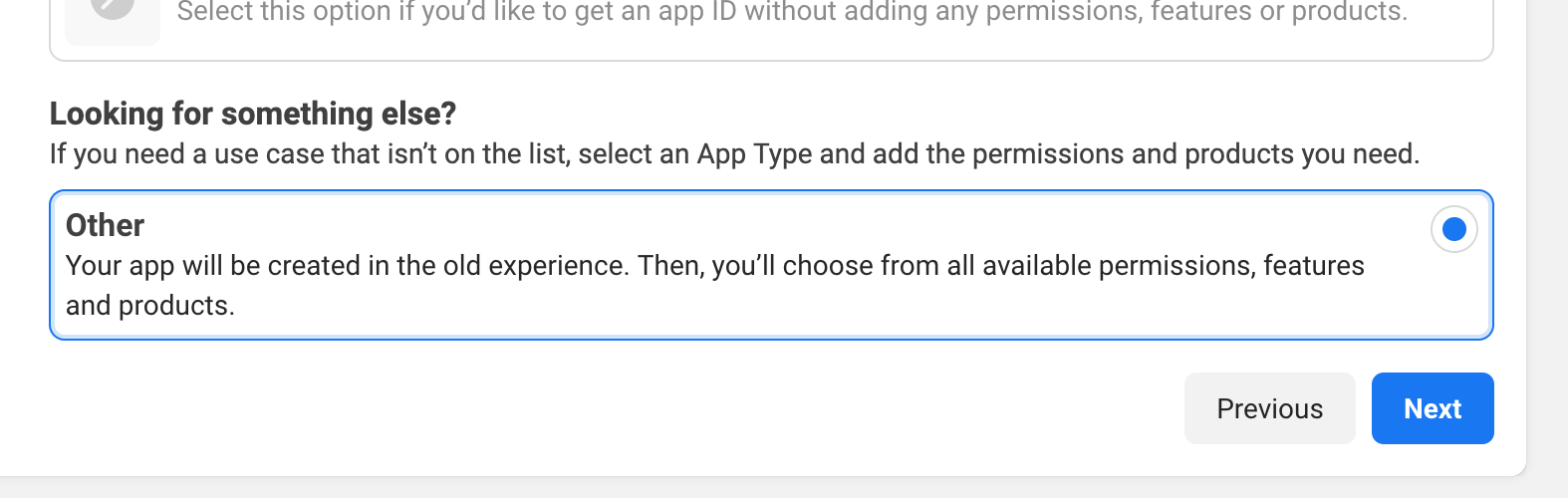
The major pitfall: Meta recently changed its Developer Portal, making it nearly impossible to create an app that can request access to Instagram accounts later on. If you create a new app and follow the default workflow, the option to access the Instagram API won't be available. Instead, when prompted to select "use cases" for your app, pick "Other," which will give you the "old experience" (Meta's wording!). Then, after the app is created, you can select Instagram as a "product" and, later, use the Graph Explorer to request the "instagram_content_publish" permission.