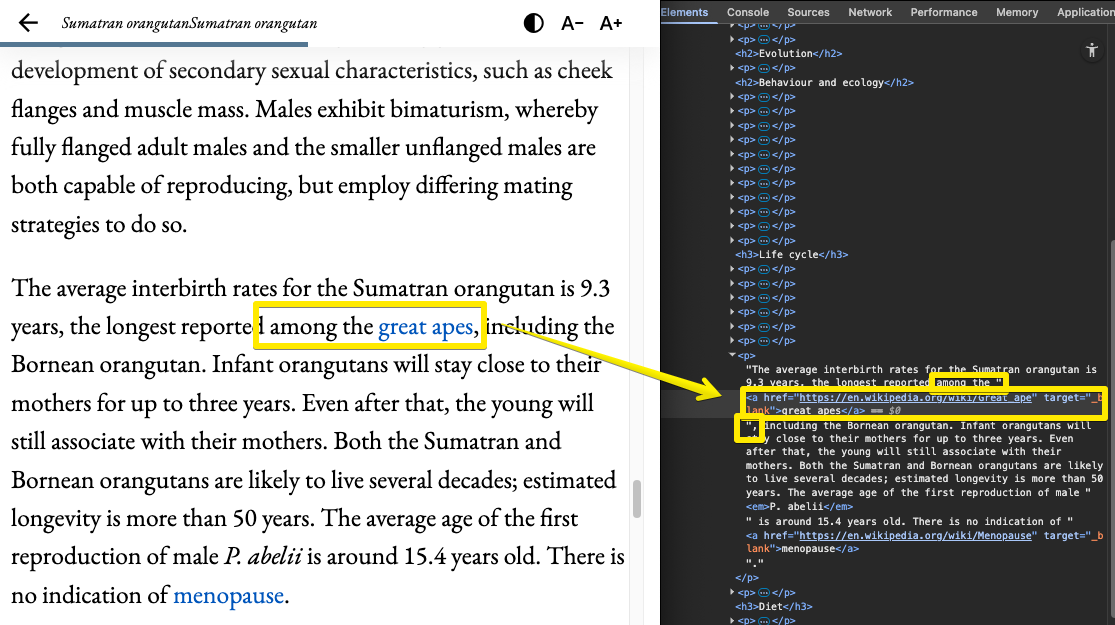
The “highlights” feature in the poketto.me reader looks deceptively simple: select a text range, and it gets highlighted in yellow. Clicking a highlight opens a small context menu to change its color or delete it.
But the implementation? Much thornier than you’d think. Why?
1️⃣ Browser selections are relative to visible text, not the underlying DOM tree of the rendered HTML.
2️⃣ A selection is defined by the text plus its start offset (characters before the selection) and end offset.
3️⃣ To do anything useful with a selection (beyond copying text to the clipboard), you have to map it back to its position in the DOM tree.
4️⃣ That “mapping” is, to some extent, impossible to get perfectly right. A selection can span multiple nodes, start and end at different levels of depth, and include irrelevant nodes.
Take this as an example:
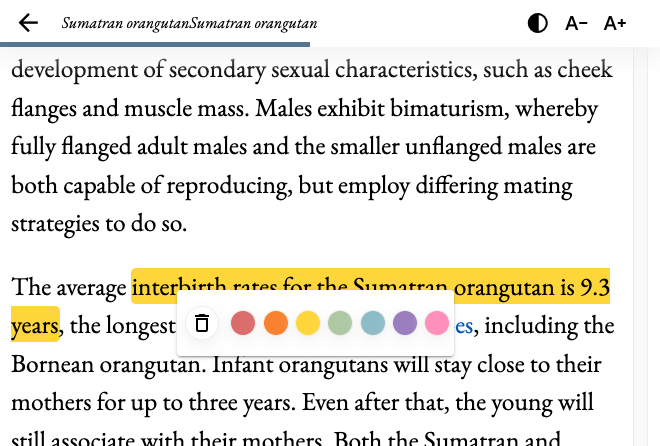
If a user selects “among the great apes,” the selection includes text, an <a…> link tag, and the comma belonging to the parent node.
My naïve approach to highlighting? Wrap the selection in a <span> with a highlight CSS class. Done.
The problem: inserting that <span> in the right spot is nearly impossible. And in more complex cases (e.g., selections including an image, headline, or whole paragraph), it completely breaks.
The “perfect” solution would be to split the selection into manageable parts, wrap each in its own <span>, and somehow tie them together logically. My interim solution is less elegant but handles ~95% of cases: if a selection spans multiple DOM elements, I truncate it at the end of the first one.
So in the example, the highlight would only cover “among the” and skip “great apes,”. Perfect? Not at all. But: Done is better than perfect (see Know When to Maximize and When to Satisfice) and in some cases, satisficing (see TIL #55) allows you to move on to new problems.