When I set up my personal blog, ralphpmayr.com, years ago, I opted for a GitLab CI pipeline to build and deploy it. However, for poketto.me, I was looking for something faster, cheaper and more closely integrated with the Google Cloud ecosystem.
I opted for Google's own CloudBuild and discovered that it integrates seamlessly with GitLab.com. In GitLab, all you need to do is create two API keys (one for read access and one for edit access), configure these in Google Cloud and CloudBuild will then be able to fetch and build any GitLab project.
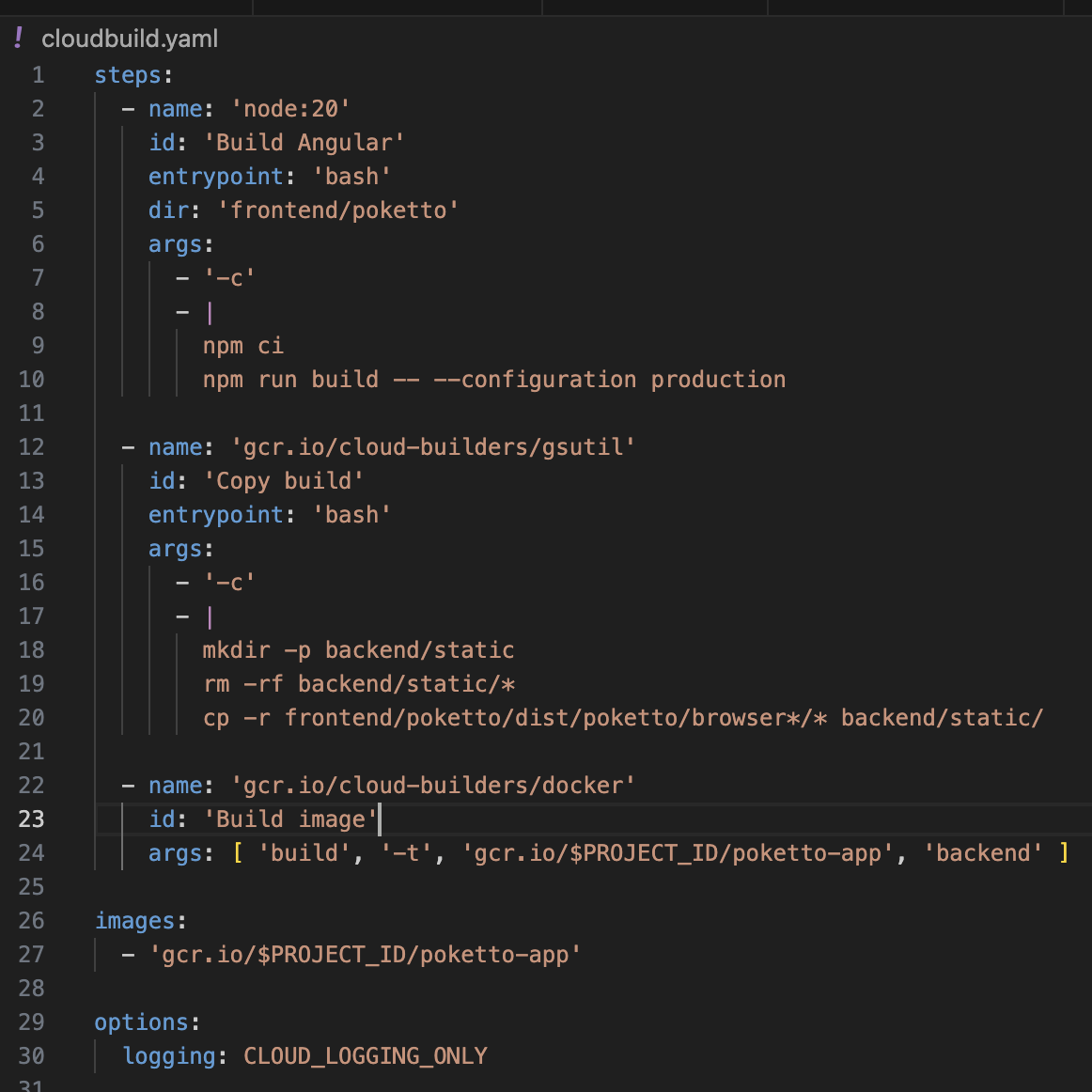
The build scripts themselves (cloudbuild.yaml) are intuitive and offer “native” support for interacting with GCP. Attached is an example that builds my Angular front end, creates a Docker image consisting of the Python back end code plus the compiled Angular, and stores the image in my GCP project. I have a separate build script that deploys the image to a Cloud Run instance, which is even simpler.
steps:
- name: 'gcr.io/google.com/cloudsdktool/cloud-sdk'
  id: 'Deploy'
  entrypoint: 'bash'

  args:
    - '-c'
    - |

    gcloud run deploy poketto-app-dev \
    --image gcr.io/\$PROJECT_ID/poketto-app \
    --region=europe-west1 \
    --platform managed \
    --allow-unauthenticated \
    --env-vars-file=env-dev.yaml

options:
  logging: CLOUD_LOGGING_ONLY